
Step 1
Compose and revise
Open Input Mode to type, select predictions, dictate a phrase, and use selection or clipboard actions. Read each dictated result before keeping or editing it.
Compose, revise, and listen back
Write is a focused offline workspace that can start blank or receive recognized text from Read. View Mode centers spoken review; Input Mode adds the keyboard, microphone, predictions, and editing controls.
Start with the classroom task
Select an observable task to keep the related product behavior, conditions, and device view together.
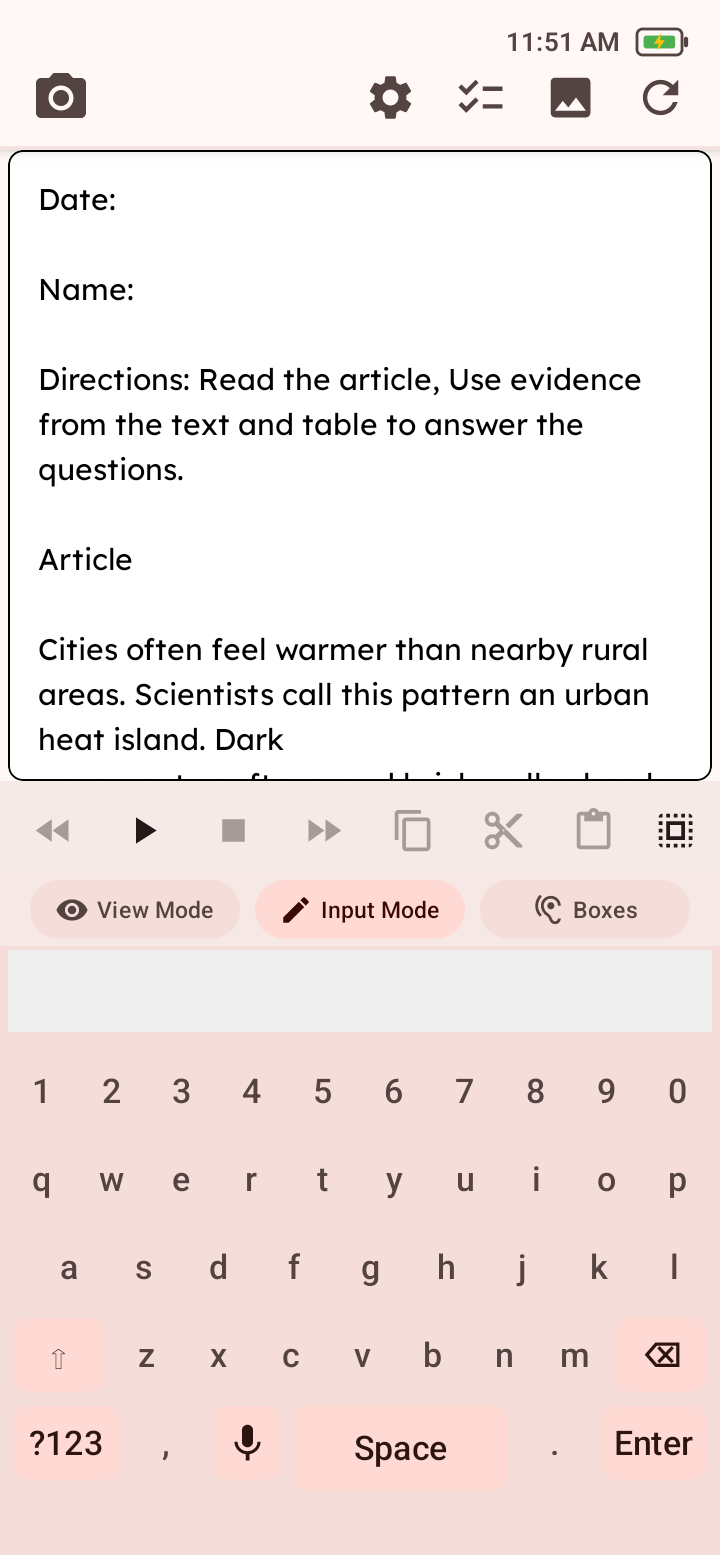
Showing Writing Support information for Type and edit text.
In Writing
Write Input Mode is a focused offline workspace with an on-screen keyboard, predictions, selection, clipboard actions, and editing.
Default Write View selects View Mode or Input Mode at entry.
Keep the page focused
Step 1
Open Input Mode to type, select predictions, dictate a phrase, and use selection or clipboard actions. Read each dictated result before keeping or editing it.
Step 2
Switch to View Mode to play, pause, stop, and navigate written text using the selected speech and highlighting settings.
Step 3
A Read capture can hand recognized text to Write. The handoff supports editing and playback, but it is not a document submission or file-sharing workflow.
Watch the recorded demo or ask about purchasing.
Launch Price: $329 per Luma R1
Shipping and applicable sales tax are calculated separately. Request a written quote for your organization. Standard quotes are valid for 30 days, and all orders are subject to Lusem acceptance and applicable terms.